

Want to stand out with a LinkedIn Premium account and attract more leads ? A LinkedIn Premium account gives you an immediate advantage in capturing the attention of recruiters and clients . Have you considered the real impact such an investment could have on your career? Discover how exclusive features can transform your online presence.
Key Points about a Premium LinkedIn Account
The LinkedIn Premium badge increases your credibility and attracts the attention of recruiters.
Unlimited profile viewing allows you toexpand your network and identify opportunities.
Application statistics help you adjust your profile to attract more recruiters.
InMails increase your chances of contacting decision-makers outside your network.
Personalized suggestions save you time in your job search.
Visibility and access with a LinkedIn Premium account
Upgrading to Premium isn't just about technical features; it's a psychological signal sent to the network. By displaying the gold badge, you indicate a proactive and professional approach.
1. The impact of the badge by sector
The effectiveness of increased visibility varies depending on your industry. Here's how the badge influences the average response rate from recruiters:
Sector | Increased profile views | Impact on response rate |
|---|---|---|
Technologies & IT | +25% | Crucial for standing out from the crowd compared to "hunted" profiles. |
Consulting & Finance | +15% | It reinforces the image of seriousness and expertise. |
Sales& Business Development | +40% | Essential for cold calling via InMail |
2. Expert Opinions: Badges as a Tool for “Social Proof”
According to Camille Travers, Personal Brandingat ERéputation Management :
“The Premium badge acts as a trust filter. For a recruiter who receives hundreds of applications, it signals a candidate who is truly investing in their career. It's an invisible but powerful differentiator.”
3. Case study: The “boost” of applications
Internal analyses and user feedback show that Premium candidates are 2.6 times more likely to be hired when they use tools and candidate highlighting.
Testimonial (Julien M., Project Manager): “Before Premium, my InMails often went unanswered. With the badge and the ability to see who viewed my profile, I was able to follow up at the right time. My response rate went from 10% to almost 35% in two months.”
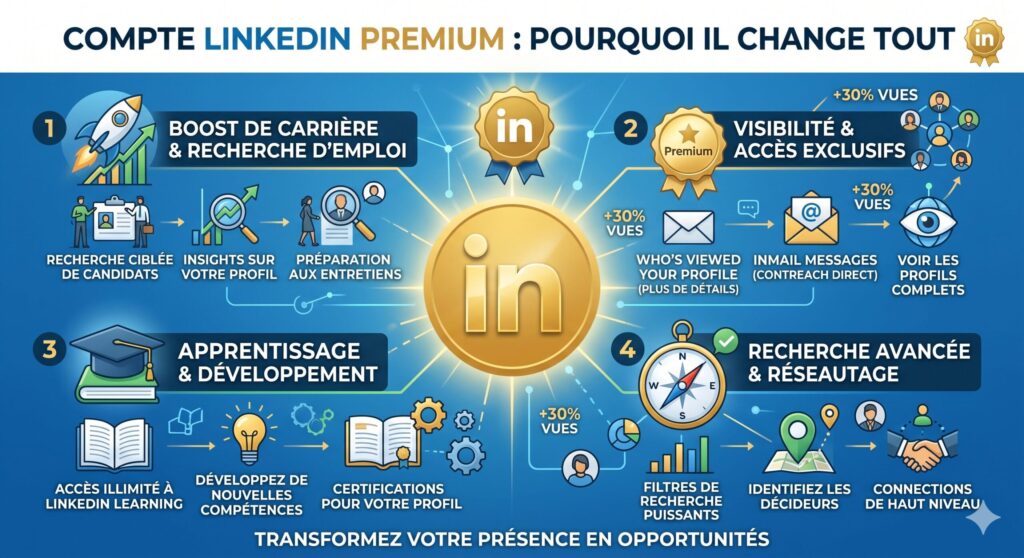
Optimization strategy : Maximize your visibility
Having the badge isn't enough; the algorithm needs to work for you. Here's how to combine your subscription with an effective SEO strategy:
Job-specific keywords: Incorporate specific keywords into your title. Use "Ideal Candidate" to identify any missing skills in your profile that match the job offers you're interested in.
The “Open Profile” mode: A Premium exclusive that allows anyone to send you a message for free, thus increasing your chances of being contacted by recruiters who do not have a Recruiter account.
Strategic note: According to a Jobscan study , profiles whose skills match at least 80% of the keywords in the job offer see their visibility tripled in recruiters' search tools.
Academic sources and resources
To delve deeper into the impact of digital identity on employability, you can consult these resources on a LinkedIn Premium Account:
LinkedIn Talent Blog: Official data on Premium hiring stats – Details the statistical advantage of Premium members.
ResearchGate / Academic Study: The Role of Social Media in Professional Signaling – An analysis of how premium signals influence perceptions of competence.
Harvard Business Review: How to Use LinkedIn to Build Your Professional Brand – Expert advice on profile optimization.
The “Premium Badge” Effect: Real-World Cases and Figures
The gold badge isn't just aesthetically pleasing; it acts as a confidence booster. Here's how it translates concretely in the job market.
1. Quantifiable results
According to LinkedIn's latest performance analysis (2024-2025), the impact on the recruitment funnel is significant:
Recruiter response rate: Premium members benefit from an average increase of 18% to 25% in the response rate to their InMail messages compared to free accounts.
Hiring speed: Candidates using Premium tools (especially application highlighting) are hired on average 9 days faster than others.
Algorithmic visibility: A complete Premium profile appears on average 3 times more often in recruiters' search results thanks to the relevance boost.
2. Case studies: From darkness to light
Case #1: Retrainingin Tech (Sophie, 32 years old)
- Challenge: Transitioning from marketing to Data Analysis without a network in the field.
- Action: Using LinkedIn Learning to obtain certifications automatically displayed on one's profile and sending targeted InMails to "Hiring Managers" thanks to unlimited profile views.
- Result: In 3 months, Sophie landed 5 interviews. She testifies: “The Premium badge validated my seriousness. Recruiters saw that I wasn't just 'visiting', but that I was investing in my transition.”
Case #2: The “Top Applicant” profile (Marc, 45 years old)
- Challenge: Senior executive seeking a highly specific position.
- Action: Marc used the “Competitive Insights” tool to adjust his keywords based on the profiles of other candidates applying for the same jobs.
- Result: By positioning himself in the “Top 10%” of candidates suggested by the algorithm, he was contacted directly by a headhunting firm without even having applied.
guide : Optimize your profile for a LinkedIn Premium account
Having a Premium account without optimizing your profile is like having a Ferrari without gas. Follow these steps to maximize your ROI (Return on Investment).
Step 1: Activate “Open Profile” mode
It's the best-kept secret. In your privacy settings, enable the open profile option.
Why? This allows any member (even non-Premium) to send you a message for free. You won't miss any opportunities.
Step 2: Align your keywords (LinkedIn SEO)
Use the “Skills Insights” feature in Premium job postings:
Identify the 10 most sought-after skills for your target position.
Integrate them naturally into your Summary (About) and your Experiences.
Expert tip: The algorithm prioritizes scanning the first 3 lines of your summary.
Step 3: Use InMails strategically
Don't waste your InMail credits.
The golden rule: Personalize it 100%. Mention a recent post from the recruiter or a specific challenge at their company.
Timing: Send your messages on Tuesday or Thursday morning, peak activity times for recruiters on the platform.
Step 4: Display your LinkedIn Learning certifications
Each training course takenon the platform can be added with one click.
Impact: Profiles with at least 3 recent certifications receive twice as many messages from headhunters.
Expert opinion: “A LinkedIn Premium Account doesn't replace talent, it makes it visible. It's a signal amplifier. If your foundation is solid, the badge becomes your best ally in breaking the glass ceiling of recruitment algorithms.” — Jean-Christophe B., Executive Recruitment Consultant.
Gold LinkedIn badge and branding for a Premium LinkedIn Account
The gold badge on your profile catches the eye from the first visit. You gain credibility with recruiters and clients. This symbol doesn't go unnoticed. It shows that you're one of those members who invest in their professional presence. Many professionals see this badge as a mark of trust. It indicates that you share valuable ideas and are an active voice in your field.
The LinkedIn Top Voice badge, for example, signals that you are a respected authority. It inspires confidence and makes people want to contact you. This small detail can open new doors and strengthen your personal brand.
Here's what the Premium badge gives you on a LinkedIn Premium Account:
Increased visibility in search results.
A distinctive symbol that attracts attention.
A strengthened brand image.
You quickly notice that people are taking you more seriously. Your LinkedIn Premium Account profile stands out from the crowd.
Unlimited profile viewing
With a LinkedIn Premium account, you can view as many profiles as you want. There's no longer a monthly limit. This changes everything for your network. You discover new contacts every day. You can analyze career paths, identify decision-makers, and prepare your outreach.
You gain access to more profiles during your searches.
You can more easily identify opportunities for collaboration or business.
You increase your chances of finding the right person to talk to.
A prominent position in search results also gives you an advantage. You appear more often in front of recruiters, increasing your chances of being noticed. A LinkedIn Premium account allows you to take your job search and professional development further.
Advanced tools for job searching
Application statistics
When you use a LinkedIn Premium account, you gain access to exclusive tools to track your applications. You can see how many people have clicked on or saved a job posting. These statistics help you understand what attracts recruiters' attention. You can then adjust your profile or application to increase your chances.
You discover if your profile stands out among the best candidates.
Do you know how many people are applying for the same job?.
You can compare your skills with those of other candidates.
Premium users report up to a 60% increase in response rates thanks to personalized recommendations. InMail messages, included in the subscription, receive 4.6 times more replies than traditional emails, giving you greater visibility and efficiency.
Personalized suggestions and search filters
With LinkedIn Premium, you benefit from job suggestions tailored to your profile. Artificial intelligence suggests opportunities where you have the best chance of being hired. You can use advanced filters to target the type of contract, salary, or company that interests you.
You add offers to your favorites to come back to them later.
You launch searches using specific keywords.
You activate alerts to receive new offers that match your criteria.
Advanced filters save you time. You find the listings that suit you faster. You stay informed as soon as an opportunity arises.
Many users report faster and more targeted job searches thanks to these tools. A LinkedIn Premium account gives you a real advantage in landing the job that's right for you.
Network development and prospecting
InMails and message credits
Want to connect with people outside your immediate network? InMails lets you do just that. You can send a personalized message to any LinkedIn member, even if you're not connected. This feature is a game-changer for prospecting and networking.
An InMail is 30 times more likely to get a response than a message sent without prior connection.
The response rate to InMails exceeds 18%. Therefore, you increase your chances of starting a useful conversation.
You save time and reach more decision-makers.
Tip: Always prepare a short and concise message. Members appreciate clarity and relevance.
With a LinkedIn Premium account, you receive InMail credits every month. This allows you to make more connections without waiting for an accepted invitation.
365-day view tracking
The 365-day view tracking lets you know who's interested in your profile. You can see a list of people who have viewed your profile over the past year. This information helps you identify opportunities for connection or business.
You identify prospects who return multiple times.
You can easily follow up with visitors who haven't yet made contact.
You analyze the trends and adapt your prospecting strategy.
Note: Many users are seeing an increase in the volume of qualified leads and a shortening of sales cycles.
Here are some measurable benefits of networking with LinkedIn Premium:
More qualified leads.
Reduction of lead acquisition costs.
Up to +312% ROI over three years according to a Forrester study.
+30% increase in revenue attributed to Sales Navigator.
+15% increase in sales productivity thanks to the automation of search tasks.
A LinkedIn Premium account therefore gives you powerful tools to accelerate your prospecting and transform your visitors into customers or partners.
Return on investment of a LinkedIn Premium account
Packages adapted to different profiles
Want to know if a LinkedIn Premium account is really worth the investment? It all depends on your profile and goals. LinkedIn offers several plans to suit every need. Here's an overview of the main offers:
Formula | Annual price (per month) | Primary target | |
|---|---|---|---|
Career | 29,99 € | 19,99 € | Job search |
Business | 59,99 € | 39,99 € | Light Business Development |
Sales Navigator Core | 79,99 € | 64,99 € | Individual B2B prospecting |
Recruiter Lite | 119,95 € | 99,95 € | Active recruitment |
You can also compare the number of InMails included and the price of each plan:
Formula | Annual price | Monthly price | Number of InMails |
|---|---|---|---|
Premium Career | 239,88 € | 29,99 € | 5 |
Premium Business | 575,88 € | 59,99 € | 20 |
Sales Navigator | 779,88 € | 79,99 € | 20 |
Recruiter Lite | 1199,40 € | 119,95 € | 30 |
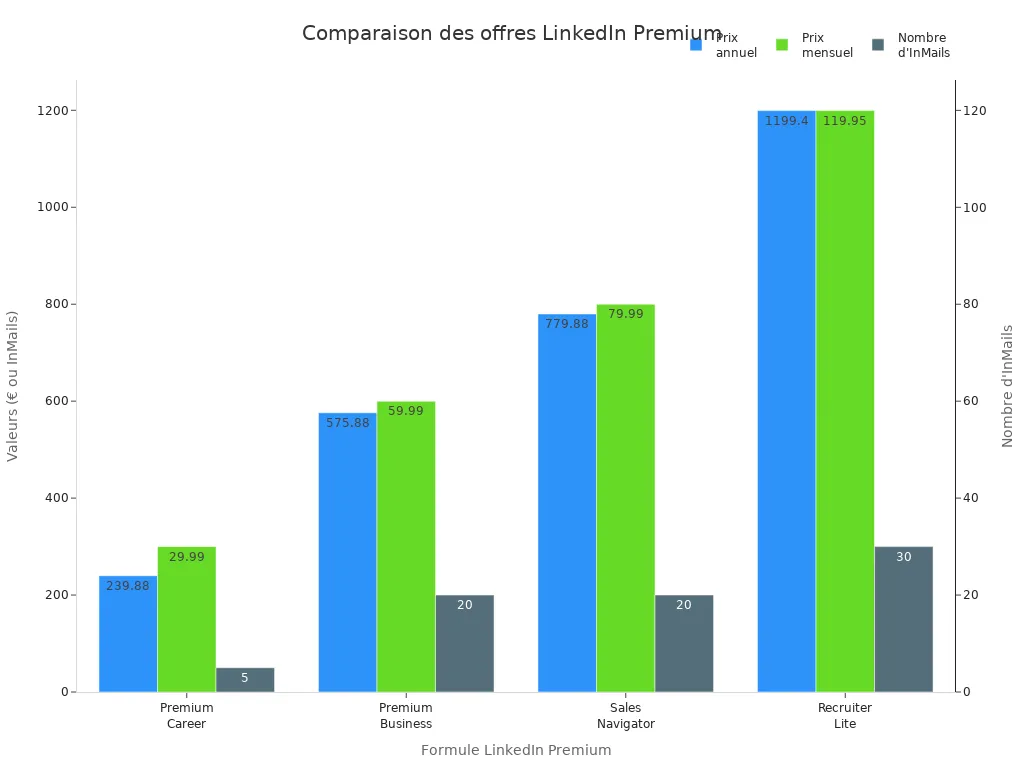
Each plan targets a specific use case. Looking for a job? The Career plan gives you access to tools to stand out. Growing your business? The Business or Sales Navigator plan helps you find more prospects. Working in recruitment? Recruiter Lite lets you contact more candidates.
Tip: The Business plan costs less than 2 euros per day. For an entrepreneur, this investment remains modest compared to the potential benefits.
To measure return on investment, you can track several key indicators:
Conversion rate : Percentage of people who take an action after seeing your profile or message.
Cost per conversion (CPA): Average amount spent to acquire a customer or a response.
Return on advertising investment (ROAS): Ratio between revenue generated and expenses on LinkedIn.
Real-life examples of career or business transformation
Do you want concrete examples? Many professionals have seen their careers or businesses evolve thanks to a LinkedIn Premium account.
A tech start-up doubled its number of leads after integrating LinkedIn Premium into its marketing strategy.
A recruitment company expanded its network and attracted more qualified candidates thanks to InMails.
Company A, a B2B software provider, increased its lead generation by 30% with Sales Navigator.
Sarah Johnson, a freelance graphic designer, found international clients thanks to the Premium career plan.
ABC Marketing Agency saw its visibility and lead generation increase after choosing the Premium Business plan.
You can also take advantage of benefits such as access to more profiles, improved visibility through LinkedIn Learning, and the ability to identify visitors to your profile. These tools help you find new clients or partners.
Here's what you get with a LinkedIn Premium account:
More qualified leads.
An expanded network.
More effective prospecting.
A return on investment that is often higher than a subscription.
You can turn simple visitors into paying customers. You save time and grow your business faster.
LinkedIn Premium offers you concrete advantages:
You gain visibility with recruiters and clients.
You develop your network more easily.
You're speeding up your prospecting.
Try out the Premium features to see their impact on your career or business. Choose the plan that best suits your goals. You can transform your online presence and achieve real results.
FAQ
Is a LinkedIn Premium account mandatory to succeed on LinkedIn?
No, you can succeed without Premium. However, you save time and gain access to more tools with a subscription. You benefit from greater visibility and grow your network faster.
Can I try LinkedIn Premium for free?
Yes, you can activate a 30-day free trial. You can explore all the features without any commitment. Remember to cancel before the end if you don't want to continue.
What happens if I cancel my Premium subscription?
You keep your profile and contacts. You lose access to Premium features like InMails and advanced analytics. You revert to a standard LinkedIn account.
Does LinkedIn Premium really improve my chances of finding a job?
Yes, you benefit from advanced filters, personalized suggestions, and increased visibility to recruiters. You increase your chances of being contacted and landing an interview.
Can I change my LinkedIn Premium plan at any time?
Yes, you can modify your subscription to suit your needs. You can switch between plans in just a few clicks. LinkedIn adjusts the price automatically.
See also
Guide to Posting Free Job Offers on LinkedIn
Using LinkedIn Newsletters as an Essential Tool for B2B
Improve Your LinkedIn Profile to Attract Recruiters