In today's digital marketing world, lead generation is a critical component for business success.
It is with this in mind that Magileads , a lead acquisition platform, was designed to offer users powerful, automated and customizable tools to capture, manage and convert prospects.
This article offers a detailed guide on how to use Magileads' "New Campaign" feature to optimize your lead acquisition strategies.
Introduction to Magileads
Magileads is a marketing automation platform that helps businesses collect and manage leads through multichannel campaigns , primarily via email and message management. It allows users to set up personalized campaign scenarios, track lead interactions, exclude specific contacts, and schedule sends, all within a user-friendly interface.
One of Magileads' key features is the ability to create lead acquisition campaigns , allowing you to target specific contact segments based on their actions and behaviors.
↗️ Discover in video how Magileads can take your agency to the next level:
The “new campaign” feature on Magileads
When you create a new campaign in Magileads, you gain access to a range of options and steps that allow you to customize your marketing efforts. The platform follows a multi-step process to help you create effective and well-targeted campaigns. Here's a detailed overview of the different steps you'll encounter when creating a campaign on Magileads.
1 – Campaign scenario
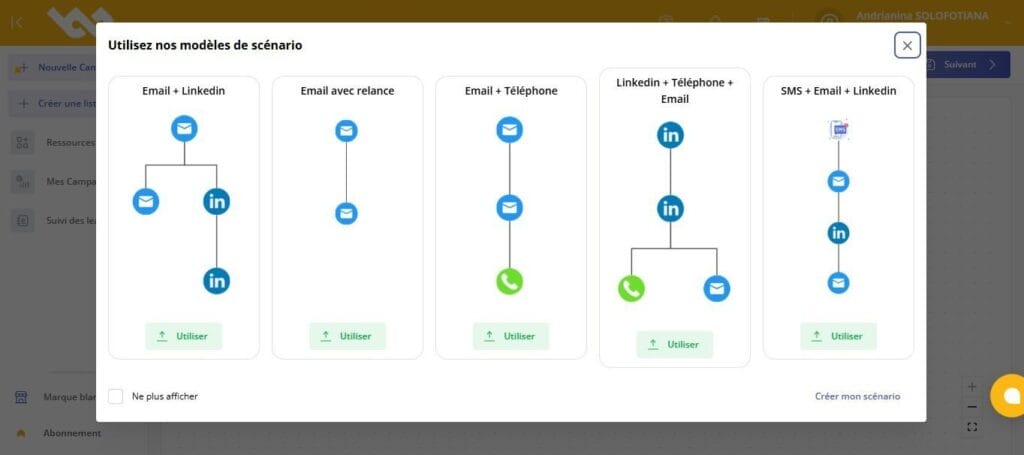
The campaign scenario forms the foundation of your campaign. This is where you define your prospect's journey—the specific actions that will occur throughout the campaign. Several options are available to customize this journey.
- Scenario Start : This step allows you to define the starting point of your campaign. You can choose the precise moment you want the campaign to begin, whether through a manual action on your part or an automated event.
- Sending an Email : One of the most common actions in lead nurturing campaigns is sending an email. You can write and personalize emails that will be sent automatically based on the triggers defined in your scenario. This allows you to reach your prospects with personalized messages based on their behavior.
- Follow-up Trigger Event : You have the option to define specific events that will trigger follow-up emails. For example, you can specify that a follow-up email should be sent to a prospect who hasn't opened an email or responded to an offer.
- Connection Request : In a professional context, it's sometimes wise to request a connection from your prospects on platforms like LinkedIn or via other social channels. This option allows you to automate this contact process.
- Contact : This action allows you to precisely define which contacts or contact groups will be included in the campaign. You can target a specific segment of your database for personalized campaigns .
2 – Choosing contact lists

One of Magileads' most powerful features is the ability to segment your contacts . Once your scenario is defined, you can select the contact lists you want to include in your campaign. These lists can be created based on various criteria, such as:
- Geographic location
- Past behavior (e.g., prospects who clicked on a previous email)
- Areas of interest
- The stage of the life cycle in which the prospect is located
Segmentation is crucial for the effectiveness of your campaigns. It allows you to send personalized messages to specific groups, thus increasing the chances of conversion.
READ ALSO: Automate the creation and enrichment of your contact lists directly from your internal systems
3 – Campaign Preview
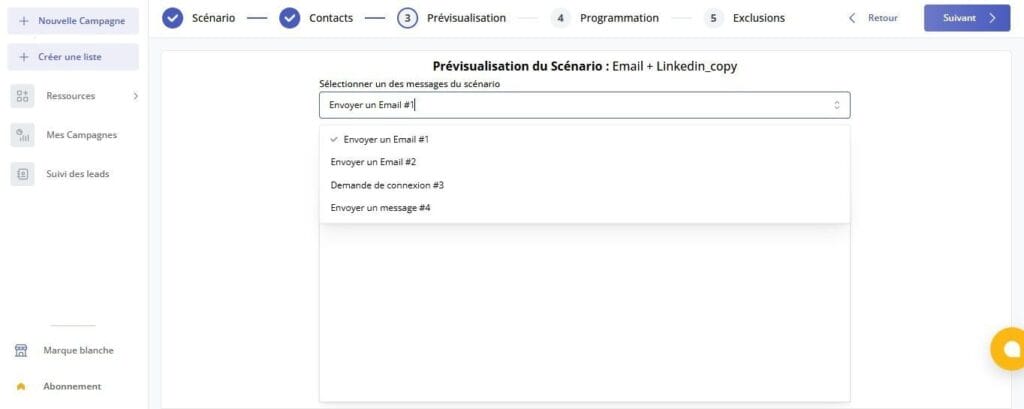
Before sending the campaign to your contacts, Magileads lets you preview the message or email you're about to send. This allows you to check the content and ensure that all elements, such as links, images, and personal information, are correctly included.
Previewing is a crucial step to avoid errors in your campaigns , especially when they are automated. A small oversight or error in the content can damage your company's credibility and affect how your prospects perceive you.
4 – Scheduling the sending
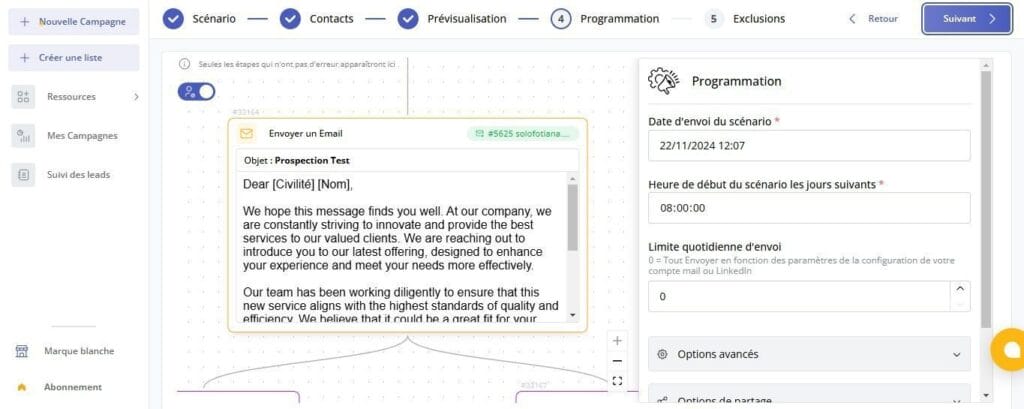
Once you're happy with your campaign preview, you can set the send time . Magileads lets you schedule your emails and messages to be sent at a specific date and time. This can be especially useful if you want to reach your prospects at a particular time of day or on a specific day (for example, avoiding sending emails on weekends).
Automating the sending process also saves time and ensures consistency in communication with your prospects.
5 – Exclusion of contacts
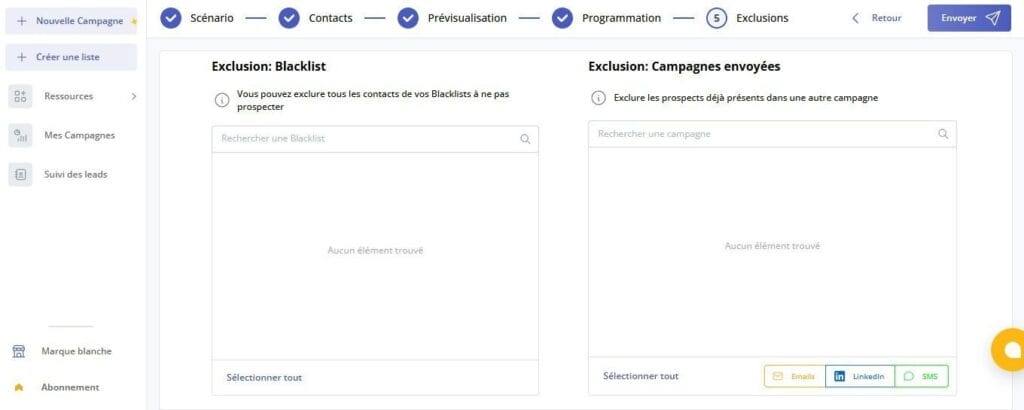
One of the advanced options offered by Magileads is the ability to exclude certain contacts from the campaign. Two types of exclusion are available:
- Exclusion – Blacklist : If a contact is on your blacklist (for example, if they have marked your emails as spam or have asked to be removed from your lists), you can exclude them from the campaign. This helps prevent damage to the reputation of your sending domain.
- Exclusion – Campaign Sent : If a contact has already received a previous version of the campaign, you can exclude them to avoid sending the same message multiple times. This is essential to maintain a positive user experience and ensure the relevance of your communications.
These exclusion options allow you to make your campaign more targeted and avoid sending unwanted messages, thus improving the effectiveness of your marketing efforts.
6 – Campaign submission

Once you have checked all the settings of your campaign, all you have to do is send it . Magileads takes care of everything else: it will send the emails or messages to the selected contacts according to the defined scenario and sending schedule.
Conclusion
Magileads is an extremely robust platform for lead generation and marketing campaign . Thanks to its advanced features, you can not only personalize your messages and target specific prospect segments, but also fully automate the process of sending, following up, and managing contacts.
Magileads' "New Campaign" feature, with its clear steps and customization options, allows you to create tailored campaigns and maximize your conversion rates. By leveraging segmentation, automation, and the ability to preview and schedule your mailings, you can not only save time but also improve the effectiveness of your lead generation campaigns.
Whether you are a small business looking to generate new leads or a large company with complex contact management needs, Magileads offers you all the tools you need to succeed in your marketing campaigns.
—————————
Magileads is prospecting automation software that allows you to easily manage all the complex aspects of your marketing processes.
Test Magileads for free in 14 days. Click here .
Or book a demo to see how it works. Click here .