

Discover Magileads V3.0, a revolutionary tool for creating a contact list in just a few clicks. You know that effective contact management is crucial to the success of your marketing campaigns. By targeting qualified leads, you increase your conversion rates and improve your ROI . Magileads V3.0 offers key features to simplify this process. You can easily manage your Magileads prospecting contact list thanks to an intuitive interface and powerful integrations. Benefit from optimized management to maximize your results.
Understanding the tool
What is Magileads V3.0?
Magileads V3.0 is an innovative platform designed to transform the way you manage your contacts and prospects. It allows you to create contact lists efficiently and quickly, while providing powerful tools to maximize your prospecting efforts.
History and evolution
Since its inception, Magileads has evolved to meet the changing needs of modern businesses. Initially, the tool focused on basic contact management. Over time, it has integrated advanced features to enrich contact lists and automate prospecting processes. This continuous evolution ensures you always have the latest tools to optimize your marketing campaigns.
Main objectives
The main objective of Magileads V3.0 is to help you generate quality leads and convert them into loyal customers. To achieve this, the platform offers features such as creating and enriching contact lists, managing interactions with prospects, and creating custom workflows. These tools allow you to effectively manage your Magileads contact list and prospecting.
Main features
Magileads V3.0 stands out for its robust features that simplify contact management and optimize prospecting.
↗️ Discover in video how Magileads can take your agency to the next level:
User interface
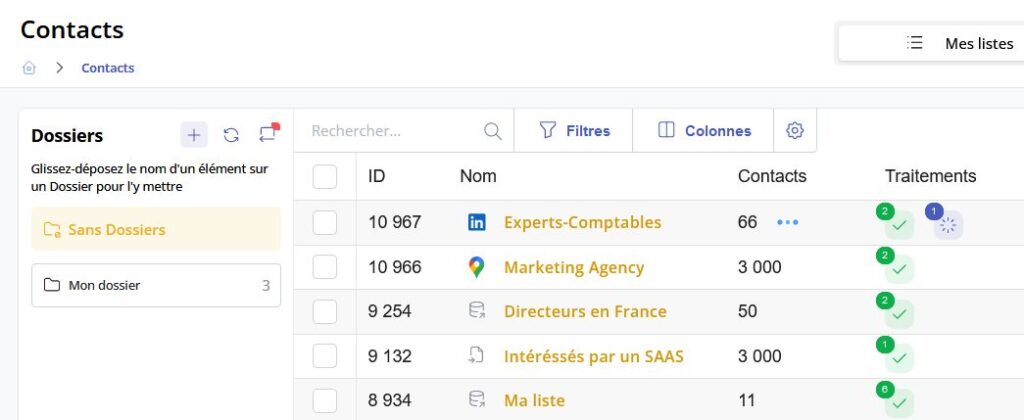
Magileads V3.0 's user interface is intuitive and user-friendly. You can easily navigate through the tool's various sections, allowing you to effortlessly create and manage your contact lists. The interface is designed to provide a seamless experience, enabling you to focus on what matters most: prospecting.
Available integrations
Magileads V3.0 offers a multitude of integrations that enhance your user experience. You can connect the platform to popular tools such as LinkedIn Sales Navigator and Google Maps to import contacts directly. These integrations allow you to expand your database and access valuable insights for your prospecting campaigns.
How do I create a contact list?

Creating an effective contact list is essential for optimizing your prospecting . With Magileads V3.0, this process becomes quick and easy. Here's how:
Step 1: Access the tool
To begin, you need to log in to your Magileads account. Make sure you have your login details handy. Once logged in, go to the section dedicated to creating lists. This section is usually accessible from the main dashboard. There you will find all the necessary options to start your Magileads prospecting contact list.
Step 2: Use quick search
Quick search is a powerful tool for refining your Magileads prospecting contact list. Start by defining your search criteria. You can specify parameters such as location, industry, or company type. Once your criteria are established, launch the search. Browse the results and select relevant contacts. This step is crucial to ensure your list contains high-quality prospects.
Step 3: Finalize and save the list
After selecting your contacts, it's important to verify their relevance. Ensure each contact meets your prospecting criteria. Once this verification is complete, save your list. Magileads V3.0 also allows you to export your Magileads prospecting contact list in compatible formats such as CSV or Excel. This facilitates the integration of your list into other management tools.
Success story : A technology company specializing in SaaS solutions used Magileads to automate its email campaigns. The result: a 40% increase in lead conversion rates and a 30% reduction in prospecting costs. This demonstrates the tool's effectiveness in optimizing prospecting processes.
By following these steps, you can create an effective and targeted Magileads prospecting contact list. This will allow you to improve your conversion rates and maximize your return on investment. For more resources, visit the prospecting blog .
Tips for optimizing the use of Magileads V3.0
Tips for an effective search
To get the most out of Magileads V3.0, you need to master certain tips that will allow you to optimize your searches and improve the quality of your Magileads prospecting contact list.
Using advanced filters
Advanced filters are essential for refining your searches. By defining precise criteria, you can target specific contacts that perfectly match your needs. For example, you can filter by industry, location, or company size. This allows you to focus your efforts on the most relevant prospects. A well-targeted search increases your conversion rates and improves the effectiveness of your campaigns.
Duplicate management
Managing duplicate entries is crucial for maintaining a clean and efficient database. Magileads V3.0 offers tools to identify and remove duplicates. By eliminating redundant entries, you prevent communication errors and optimize your resources. A duplicate-free database ensures that each contact receives personalized attention, strengthening your relationships with prospects.
Best practices for contact management
Effective contact management is key to the success of your prospecting campaigns. Here are some recommended practices to maximize the impact of your efforts.
Information is updated regularly
Keeping your contact information up to date is essential. Outdated data can lead to communication errors and harm your campaigns. Make it a habit to regularly check and update your contact information. This ensures you always have the most recent data to make informed decisions.
List segmentation
List segmentation is a powerful strategy for personalizing your campaigns. By dividing your contacts into groups based on specific criteria, you can tailor your messages to each segment. This increases the relevance of your communications and improves prospect engagement. Effective segmentation allows you to target your efforts and optimize your results.
User testimonial : “ Excellent experience with Magileads as an SME. The prospecting platform is very intuitive, with many interesting features in terms of prospect targeting. The team is very responsive and provided helpful support in creating my prospecting campaigns. I highly recommend it .”
By applying these tips, you can maximize the effectiveness of your Magileads V3.0 usage and improve your prospecting results. Optimized contact management allows you to focus your efforts on the most promising prospects and increase your return on investment. For more resources, visit the customer prospecting blog .
To recap, you've learned how to create an effective contact list with Magileads V3.0 in three simple steps: access the tool, use the quick search, and finalize your list. This tool offers numerous advantages. You benefit from an intuitive interface, powerful integrations, and optimized contact management. These features allow you to improve your prospecting campaigns and increase your return on investment .
—————————
Magileads is prospecting automation software that lets you easily manage all the complex aspects of your marketing processes.
Test Magileads for free in 14 days. Click here .
Or book a demo to see how it works. Click here .







