

Email marketing is a powerful strategy for reaching your target audience and generating leads. However, creating personalized messages for each recipient can be daunting and time-consuming.
This is where Spintax comes in, a tool that allows marketers to easily messages
In this guide, you will discover how Spintax can revolutionize your cold emailing campaigns .
The basics for understanding Spintax
Spintax uses curly braces {} to generate alternative variations within a message. For example:
{Hello|Hi|Hey} {Jean|Marie},
In this example, {Bonjour|Salut|Hey} offers three greeting options, while {Jean|Marie} offers two name options. Using them together creates a multitude of combinations, making each email unique and personalized.
How to create emails with Spyntax?
To illustrate its practical application, consider the following model:
Object :
{Improve Your {Sales|Revenue|Profits}|Boost Your {ROI|Business Growth}}
Email Body:
{Hello|Hi} {Jean|Marie},
I have noticed that {your company|Acme Corp} {could benefit from|needs} our {sales increase|revenue generation} services.
As a marketing expert/business consultant, I've helped companies like yours improve their sales/revenue and boost their ROI/profits. I look forward to discussing how we can help your company, Acme Corp, achieve similar success.
Please let me know if {you are interested in learning more|you would like to schedule a call}.
Sincerely,
[Your Name]
Here, Spintax enabled the effortless creation of personalized messages, tailoring each email to resonate with individual recipients based on their profile and needs.
➡️ Watch the explanatory video
How to use Spintax Nesté for advanced customization?
You can use Spintax Nesté to achieve higher levels of personalization within a single message. For example:
Object :
{Improve Your {Sales|Revenue|Profits} with Our {Expertise|Services}|Boost Your {Business|ROI} with Our Help}
In this case, Spintax Nesté allows for even more variations, ensuring that each email stands out while maintaining consistency and relevance.
Integrate Spintax emails into a Magileads campaign
To integrate emails created with Spintax into an email campaign on Magileads, follow these steps:
1 – Create email templates with Spintax
You can use Spintax to generate variations of personalized emails. For example, you can create email templates like this one:
Object :
{Improve Your {Sales|Revenue|Profits}|Boost Your {ROI|Business Growth}}
Email Body:
{Hello|Hi} {Jean|Marie},
I have noticed that {your company|Acme Corp} {could benefit from|needs} our {sales increase|revenue generation} services.
As a marketing expert/business consultant, I've helped companies like yours improve their sales/revenue and boost their ROI/profits. I look forward to discussing how we can help your company, Acme Corp, achieve similar success.
Please let me know if {you are interested in learning more|you would like to schedule a call}.
Sincerely,
[Your Name]
2 – Integration with Magileads
Once your email templates are ready, here's how you can integrate them into an email campaign on Magileads :
Step 1: Log in to your Magileads account
Log in to your Magileads .
Step 2: Creating a new campaign
Go to the “Campaigns” on Magileads and click on “New Campaign.
Step 3: Campaign setup
Fill in the required information such as the campaign name, email subject, etc.
For the email subject, you can use a Spintax like this:
{Improve Your {Sales|Revenue|Profits}|Boost Your {ROI|Business Growth}}
Step 4: Importing your contact list
Import your contact list into Magileads. Make sure this list includes all relevant information such as names and email addresses.
Step 5: Personalizing emails with Spintax
Use Magileads' email personalization feature to integrate Spintax into the body of your email. Magileads allows you to import HTML templates or enter rich text directly.
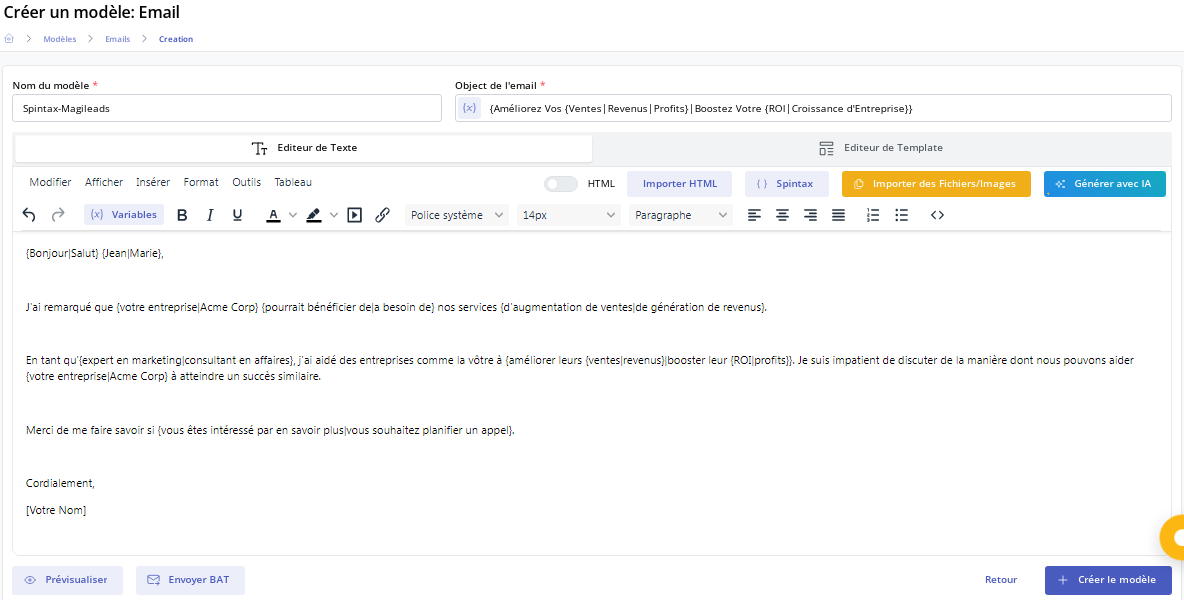
Step 6: Campaign verification and submission
Before sending the campaign, preview it to ensure that the Spintax is interpreted correctly and that the emails appear as expected.
Configure the sending parameters such as the date and time of sending, and launch your campaign.
3 – Monitoring and analysis of results
After sending your campaign, use Magileads' analytics tools to track the results:
- Check open and click rates to evaluate the performance of different email variations generated by Spintax.
- Use this data to optimize your future mailings by choosing the variations that generate the best results.
By following these steps, you will be able to effectively integrate emails created with Spintax into your email campaigns on Magileads , maximizing the personalization and impact of your marketing messages.
What are the advantages of using Spintax in an email campaign?
Spintax can definitely bring a lot to your email campaign. Here are the key points to note:
1 – Improved personalization
By incorporating recipient-specific details such as names and company information, Spintax makes each email unique and personalized, thereby increasing engagement and response rates.
2 – Improving email deliverability
Spintax reduces the risk of emails being marked as spam by generating unique content for each message. This improves deliverability and ensures your emails reach the intended recipients' inboxes.
3 – Efficiency and scalability
Automating the message variation process with this tool saves time and resources, allowing marketers to send personalized emails at scale without compromising quality.
4 – A/B testing and optimization
Marketers can use the tool to conduct A/B tests on different email variations, identifying the messages that resonate best with their audience. This data-driven approach helps optimize campaigns for maximum effectiveness.
Best practices for using Spintax effectively
Here are the best practices for a successful email campaign with Spyntax:
1 – Maintain clarity and consistency
While Spintax offers flexibility, ensure that each variation remains consistent and aligns with your brand voice and messaging strategy.
2 – Testing
Before deploying campaigns, carefully test the variations of Spintax to verify their functionality and ensure accurate rendering on different email clients and devices.
3 – Avoid excessive use
While Spintax offers extensive customization, it can complicate email content and reduce readability. Use it sparingly and prioritize clarity.







