

Creating an effective contact list is essential for optimizing your marketing strategies. It allows you to make informed decisions based on concrete data. Google Maps and Magileads prove to be powerful tools for prospecting. Google Maps helps you identify and collect valuable information about businesses. Magileads, on the other hand, facilitates the organization and use of this data.
Use Magileads to create a contact list from Google Maps
Understanding its features
Magileads stands out for its robust features that simplify the creation and management of contact lists. You can automatically import data from reliable sources, greatly streamlining the information gathering process.
Contact management
Managing contacts in Magileads is intuitive. You can organize your data according to specific criteria, such as industry or location. This organization allows you to effectively structure your contact list.
Integration with other tools
Magileads offers seamless integration with other tools, enriching your contact lists. You can create multi-channel sequences to reach your prospects through different channels. This integration ensures more targeted and effective prospecting, maximizing your marketing efforts.

Benefits
Using Magileads for prospecting offers several significant advantages. You can optimize your campaigns and improve your lead management.
Efficiency and time savings
With Magileads , you benefit from fast contact import . The intuitive interface allows you to manage your contact lists effortlessly. This efficiency translates into significant time savings, allowing you to focus on other aspects of your prospecting strategy.
Improved lead management
Advanced contact segmentation is a major strength of Magileads . You can create segments based on specific criteria, such as behavior or location. This segmentation allows you to personalize your messages for each segment, making your campaigns more precise and effective.
By using Magileads to create a contact list from Google Maps , you optimize your prospecting efforts. This allows you to target your campaigns more precisely and improve your lead management.
Steps to extract contacts from Google Maps

To create an effective contact list, you need to follow specific steps to extract contacts from Google Maps. This process allows you to maximize the potential of Google Maps to generate qualified leads and boost your business growth.
Research and identification of companies
Start by searching for and identifying relevant businesses on Google Maps. This step is crucial for prospecting.
Using search filters
Use the search filters to refine your results. For example, if you're targeting restaurants, you can filter by cuisine type or location. These filters help you quickly identify businesses that match your search criteria.
Collection of relevant information
Once you've identified the businesses, gather the relevant information. Note the name, address, phone number, and website of each business. This data is essential for enriching your Magileads Contact List. Organize this information in a table for easier management.
Extracting contact data
After collecting the information, proceed to extract the contact data. This step is essential for integrating this data into your prospecting strategy.
Use of extraction tools
Use data extraction tools to automate the process. These tools allow you to quickly retrieve contact data from Google Maps. They simplify the creation of your contact list, saving you time.
↗️ Watch the video to learn how to extract contacts from Google Maps into Magileads:
Data verification and organization
Verify the accuracy of the extracted data. Ensure the information is up-to-date and precise. Then, organize this data into your contact list. This organization allows you to structure your prospecting efforts and optimize your lead management.
By following these steps, you can effectively create a Magileads contact list from Google Maps. This process helps you target your campaigns more precisely and improve your prospecting efforts.
Integrating contacts into Magileads
Integrating contacts into Magileads is a crucial step to fully leverage the data collected from Google Maps . This process allows you to structure your information effectively and optimize your prospecting efforts.
Importing data into Magileads
To import your data into Magileads , you need to follow a simple, but essential process.
Compatible file formats
Magileads supports several file formats for importing contacts. You can use CSV or Excel files to transfer your data. These formats are widely used and allow for seamless integration of information into your contact management system.
Step-by-step import process
Prepare your file : Ensure your CSV or Excel file is correctly formatted. Each column should correspond to a contact field, such as name, address, or phone number.
Access the import interface : Log in to your Magileads and navigate to the contact import section.
Upload your file : Select the option to import a file and upload your CSV or Excel document.
Check the data : Before finalizing the import, verify that all information is correct and well organized.
Finalize the import : Once the data has been verified, confirm the import to add the contacts to your Magileads Contact List .
Contact management and exploitation
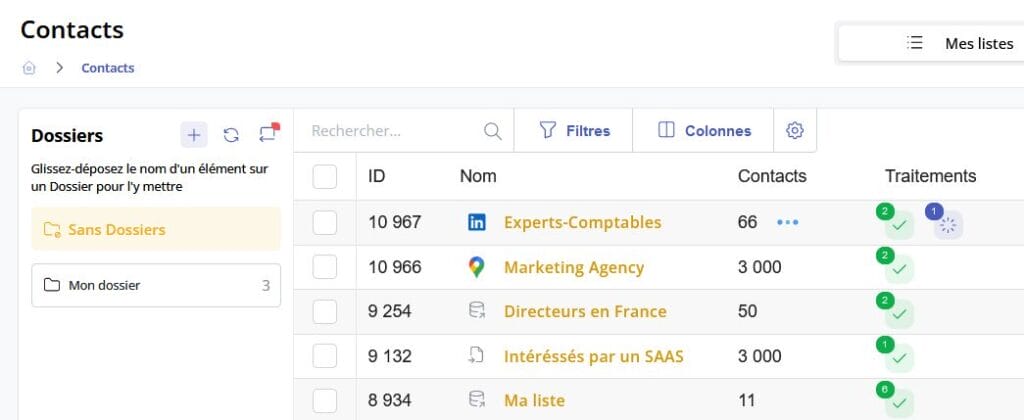
Once your contacts are imported, you can manage and use them effectively thanks to Magileads .
Contact segmentation
Segmentation is a key feature that allows you to divide your contacts into specific groups. You can create segments based on criteria such as industry, location, or purchasing behavior. This segmentation helps you personalize your prospecting campaigns and target your messages more precisely.
Use of tracking features
Magileads offers powerful tracking tools to monitor your contacts' engagement. You can track interactions, such as email opens or link clicks, to assess the effectiveness of your campaigns. This information allows you to adjust your prospecting strategies and continuously improve your results.
By integrating your contacts into Magileads , you optimize your ability to manage and leverage your data for more effective prospecting. This process helps you structure your efforts and maximize the impact of your marketing campaigns.
Creating a contact list from Google Maps in Magileads proves to be a simple and effective process. You've learned how to search for businesses, extract relevant data, and integrate it into Magileads. This method optimizes your contact management and improves your prospecting campaigns.
Testimonial : “ Magileads has simplified our contact management process. We have saved valuable time.”
Using Magileads allows you to centralize your information and personalize your interactions. This enables you to increase your conversion rate and strengthen customer engagement. Put these tips into practice to maximize your marketing efforts and achieve your business goals. le-blog-de-la-prospection-client
—————————
Magileads is prospecting automation software that allows you to easily manage all complex aspects of your marketing processes.
Test Magileads for free in 14 days. Click here .
Or book a demo to see how it works. Click here .







