

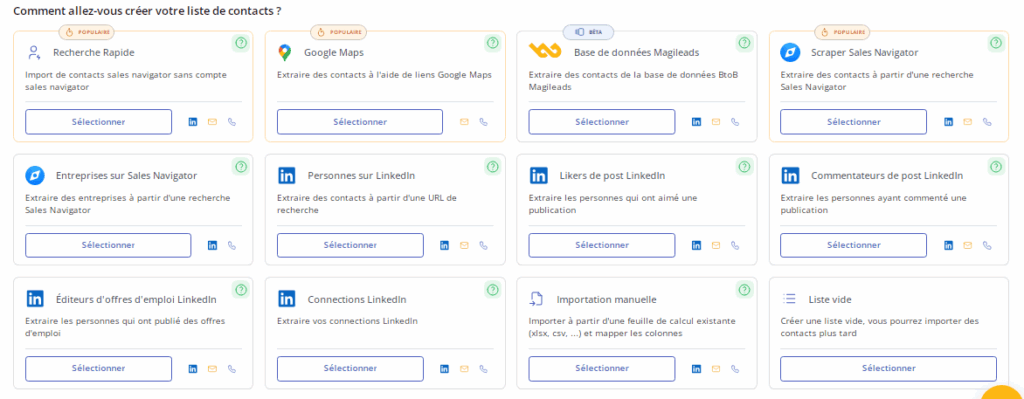
create a contact list
Looking to optimize your B2B prospecting? Use Magileads-LinkedIn-prospecting to build an effective contact list. LinkedIn generates approximately 80% of B2B leads , making it an essential tool for B2B prospecting. By integrating Magileads, you improve your efficiency and precision. Did you know that 60% of B2B prospects prefer to interact with salespeople in their network? This method allows you to precisely target your prospects, thus increasing your conversion rates . Adopt a qualitative approach to develop your network and maximize your business opportunities.
Presentation of Magileads
Magileads is a powerful solution for those looking to optimize their B2B prospecting. This innovative marketing automation platform centralizes all your sales and marketing campaigns. Using Magileads, you can easily create and manage contact lists from your LinkedIn searches. This allows you to effectively target your prospects and improve your sales performance. Magileads offers an intuitive interface that simplifies the lead generation process, allowing you to focus on what matters most: converting your prospects into customers.
Key features for prospecting and creating a contact list
Magileads offers several key features that facilitate prospecting:
Integration with LinkedIn : Connect your LinkedIn account to Magileads to directly access relevant profiles and create targeted contact lists.
Advanced search filters : Use specific criteria such as industry, position, or location to refine your searches and identify the most relevant prospects.
Quick import : Import your LinkedIn search results into Magileads in just a few clicks, saving you time and allowing you to organize your contacts efficiently.
Data enrichment : Add additional information to your contacts to improve the quality of your lists and personalize your prospecting approaches.
Interaction tracking : Monitor interactions with your contacts to analyze the performance of your campaigns and adjust your strategies accordingly.
By leveraging these features, you maximize your prospecting efforts and increase your chances of success in creating a contact list for lead generation.
↗️ Discover in video how Magileads can take your agency to the next level:
Steps to create a contact list with Magileads
Create and connect your Magileads account
To begin, you need to create a Magileads account. Go to the official Magileads website and follow the instructions to register. Once your account is created, log in to access the user interface. This step is crucial for using all the features of Magileads-LinkedIn-prospecting.
LinkedIn integration and initial setup
After creating your Magileads account, the next step is to integrate your LinkedIn account. In your Magileads account settings, select the option to connect LinkedIn. This integration allows you to directly access LinkedIn profiles from Magileads-LinkedIn-prospecting. Be sure to follow the instructions to authorize access to your LinkedIn account. This ensures compliant and ethical use Magileads emphasizes , which strictly adheres to LinkedIn's scraping limitations.
Using advanced search filters
Once your LinkedIn account is integrated, you can start using Magileads-LinkedIn-prospecting's advanced search filters. These filters allow you to precisely target your prospects based on specific criteria such as industry, job title, or location. To optimize your search, clearly define your criteria and use the available options to refine your results. This helps you create a highly relevant contact list, thus increasing your chances of success in prospecting.
By following these steps, you can effectively create and manage a contact list with Magileads-LinkedIn-prospecting, thus maximizing your B2B prospecting efforts.
↗️ Discover in video how Magileads can take your agency to the next level:
Importing and organizing contacts
Import search results into Magileads to create a contact list
To import your LinkedIn search results into Magileads , start by selecting the profiles you want to add to your contact list. Once you've made your selection, use Magileads' quick import option to transfer this data directly into the platform. This process is simple and fast, saving you valuable time in managing your leads.
Magileads allows you to import essential information such as name, surname, job title, company, and even email address if available. This public contact data , like email or company website, is crucial for establishing effective communication with your prospects. In just a few clicks, you can enrich and build a contact list from your database and prepare your next prospecting efforts.
Filter and organize your contacts
Once your contacts are imported, it's important to organize them to optimize your prospecting strategy. Use Magileads' filtering tools to segment your contacts according to relevant criteria: industry, company size, or decision-making level. This segmentation allows you to personalize your approaches and tailor your messages to the specific needs of each group.
To make tracking and managing your leads easier, add custom tags to your contacts. These tags help you quickly identify each contact's key characteristics and prioritize your actions. Effectively organizing your contacts allows you to maximize your prospecting efforts and increase your conversion rates.
Enriching and using data to create a contact list
Enhance contact information
To maximize the effectiveness of your prospecting campaigns, enrich your contact information. Magileads offers powerful tools to fill in missing data. You can add details such as email addresses, phone numbers, and social media information. These additions allow you to personalize your campaigns and increase your conversion rate.
Tip : A study has shown that data enrichment can increase marketing campaign conversion rates by 25%. Use this strategy to achieve better results.
Exporting or using the data for prospecting
Once your data is enriched, you have several options for using it. You can export your contact list in various formats such as CSV or Excel. This facilitates integration into your CRM or other marketing tools.
Export : Choose the format that best suits your needs. Exporting allows you to keep your data organized and ready to use.
Direct use : Magileads allows you to use the data directly for prospecting activities. You can launch email or phone campaigns, precisely targeting your prospects.
By using these methods, you optimize your prospecting strategy and increase your chances of success.
Monitoring and analysis of interactions
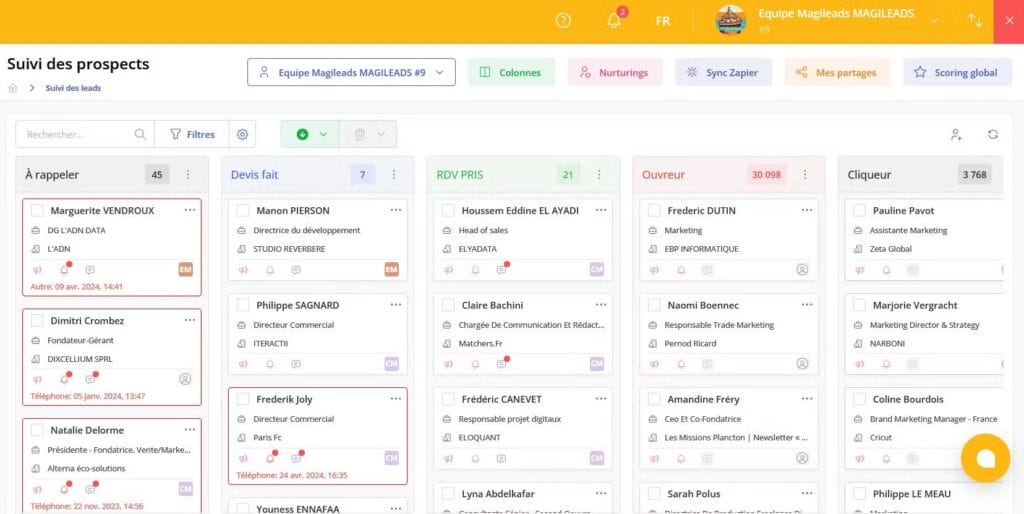
Track interactions with your contacts
To maximize the effectiveness of your prospecting, you need to closely monitor interactions with your contacts. Magileads offers powerful tools for this. You can see who has opened your emails, clicked on your links, or replied to your messages. This information helps you understand your prospects' engagement.
Email tracking : Observe open and click rates to assess the interest of your contacts.
Responses : Note the responses received to identify the most interested prospects.
Social interactions : Monitor social media interactions for an overview of engagement.
By monitoring these interactions, you can adjust your communication strategies to better meet the expectations of your prospects.
Analyze the results to optimize prospecting and create a contact list
Analyzing results is crucial for optimizing your prospecting efforts. By examining the collected data, you can identify what's working and what needs adjustments. One study found that 70% of companies using structured surveys saw a significant increase in employee engagement. This highlights the importance of analysis for improving performance.
Campaign evaluation : Analyze conversion rates to determine the effectiveness of your campaigns.
Data segmentation : Use data to segment your prospects and personalize your approaches.
Continuous improvement : Adapt your strategies based on results to maximize your chances of success.

By integrating these practices, you optimize your prospecting and increase your business opportunities.
Compliance and updates to create a contact list
Compliance with data protection rules
To ensure ethical and legal prospecting, you must comply with data protection regulations. The GDPR (General Data Protection Regulation) imposes strict principles. You must process data lawfully, transparently, and securely. Make sure that each contact has given their consent to receive marketing communications.
Tip : When building a contact list, regularly check that your practices comply with the GDPR. This protects your business from penalties and strengthens the trust of your prospects.
Keep the list up to date and create a contact list
Creating an up-to-date contact list is essential for effective prospecting. You should regularly check and update your contact information. This includes removing inactive or outdated contacts and adding new, relevant information.
Regular verification : Schedule periodic checks to maintain the accuracy of your list.
Update information : Add new data when you obtain additional information about your contacts.
Removing duplicates : Eliminate duplicate entries to avoid communication errors.
By keeping your list up to date, you improve the quality of your prospecting campaigns and increase your chances of success.
To create an effective contact list, follow the key steps outlined in this guide. Magileads helps you optimize your prospecting with its advanced features. You can automate and personalize your approaches for each prospect segment. This improves the relevance of your communications and increases your conversion rates.
Tip : Use Magileads to centralize your data and adjust your strategies in real time. This allows you to maximize your prospecting efforts and achieve your business goals. Adopt these best practices to succeed in your B2B prospecting.
How to create a list of contacts from LinkedIn searches in Magileads?
LinkedIn is a goldmine for B2B professionals, and tools like Magileads allow you to automate the creation of qualified contact lists. In this article, we explore how to effectively leverage LinkedIn search with Magileads, drawing on proven methods and expert advice.
1. Why use Magileads to create a LinkedIn contact list?
automated prospecting tool that extracts LinkedIn profiles based on specific criteria (industry, job title, location, etc.). Unlike manual methods, it saves time while respecting LinkedIn's limitations to avoid account restrictions.
According to Mark Hunter , B2B sales expert and author of “High-Profit Prospecting” , intelligent automation is essential to scale your prospecting without losing relevance.
“Tools like Magileads allow you to target qualified leads while maintaining a personalized approach, which is crucial for high conversion rates.”
– Mark Hunter
Further proof : A HubSpot shows that companies using prospecting automation tools see an increase in their sales opportunities.
🔗 Source: HubSpot – Sales Prospecting Automation
2. Steps to create a contact list with Magileads
a. Configure your search criteria on LinkedIn
Before using Magileads, perform an advanced search on LinkedIn by filtering by:
- Industry (e.g.: SaaS, Finance)
- Function (e.g.: CMO, IT Manager)
- Location (e.g.: France, Europe)
- Keywords (e.g., “Digital Transformation”, “Cloud Computing”)
Advice from Janine Allis , founder of Boost Juice and B2B growth expert:
“The more precise your criteria, the more relevant your list will be. Avoid overly broad searches so as not to dilute your target audience.”
b. Export the profiles with Magileads to create a contact list
Once you have completed your LinkedIn search:
- Activate the Magileads extension on your browser.
- Start the extraction of the displayed profiles.
- Enrich the data (emails, phone numbers) using the tool.
Concrete example for creating a contact list : A company specializing in CRM software used Magileads to extract 500 CFO profiles in less than an hour, compared to several days using the manual method.
🔗 Source: Magileads – LinkedIn extraction
3. Optimize your list with segmentation
To maximize the effectiveness of your prospecting, segment your contacts according to relevant criteria.
📌 Box: The 4 types of segmentation in B2B prospecting
| Segmentation type | Examples | Utility |
|---|---|---|
| Demographic | Sector, Company Size | Target by organizational structure |
| Behavioral | Previous purchases, Engagement on LinkedIn | Adapt the message according to the actions |
| Psychographic | Values, Professional Objectives | Personalize the emotional approach |
| Geographical | Country, City | Adapt to local time zones and markets |
According to Philip Kotler , the father of modern marketing, segmentation is the key to effective prospecting:
“A generic message doesn't convert. Segmentation allows you to send the right message to the right person.”
🔗 Source: Kotler – Marketing Management
4. Best practices for creating a contact list and avoiding LinkedIn restrictions
LinkedIn limits automated actions to prevent spam. Lead generation expert Perry Marshall
“Use tools like Magileads in moderation, respecting query limits to avoid blockages.”
Other tips for creating a contact list:
- Alternating between manual and automated searches
- Do not extract more than 100 profiles per day to remain under the radar.
🔗 Source: Perry Marshall – LinkedIn Prospecting
Conclusion on creating a contact list
Magileads is a powerful tool for transforming your LinkedIn searches into actionable contact lists. By combining intelligent extraction , advanced segmentation , and best practices , you optimize your prospecting while remaining compliant with LinkedIn's guidelines.
To go further :
- Books : “Fanatical Prospecting” by Jeb Blount
- Additional tools : Lusha, Hunter.io
🔗 Source: Jeb Blount – Fanatical Prospecting
Magileads is a prospecting automation software that allows you to create a contact list and easily manage all the complex aspects of your marketing processes.
Test Magileads for free in 14 days. Click here .
Or book a demo to see how it works. Click here .







