


A practical guide to creating an email address in 2026
Creating a free email address in 2025 is within everyone's reach. Services like Gmail, Outlook, and Proton Mail offer simple and efficient solutions. An email address quickly becomes essential for exchanging messages, accessing online platforms, and saving important files. Creating emails with these modern tools guarantees a smooth and secure experience, even for beginners.
Key points for creating a free email address
Creating a free email address is easy for everyone. Choose a service like Gmail, Outlook , GMX , or Proton Mail, depending on your needs.
Creating an email address helps with communication. It's used to send and receive messages quickly, for work or to talk with friends and family.
Creating an email address helps keep your data secure with strong passwords. Also, enable two-factor authentication to protect your account.
Creating an email address helps you organize your emails with folders and labels. This allows you to better organize your messages and find them easily.
Choose services that respect your privacy, such as Proton Mail. This protects your personal information.
The 5 pillars for creating an optimal email address (2026 Guide)
Data context : With 4.37 billion email users worldwide (55% of the global population) and an average of 347 billion emails sent daily , your email address constitutes your primary digital identity. 91% of consumers check their email at least once a day , making this choice a major productivity and security issue.
1. Choose the ecosystem that best suits your needs to create an email address (not just a name)
Why this is crucial : Each service has a different architecture that will impact your future productivity. Gmail excels at mobile integration (1.8 billion active users), Outlook optimizes calendar-email synchronization for professionals, while ProtonMail guarantees confidentiality through end-to-end encryption (zero-access encryption).
The risk : Migrating 10 years of emails to a new provider costs on average 15 hours of work and exposes you to the loss of archived data.
“I created a Gmail address for my freelance business because I knew I would be using Drive and Docs. As a result, I save 30 minutes a day managing client files. If I had used Yahoo Mail, I would have had to juggle three different platforms.” — Marc D., freelance consultant, Lyon
2. Secure your digital front door (strong authentication required)
Why this is vital : 81% of data breaches are linked to weak or stolen passwords . A compromised email address gives access to reset all your other accounts (bank, social networks, government).
The 2026 imperative : Two-factor authentication (2FA) via application (Google Authenticator, Authy) reduces the risk of intrusion by 99.9% compared to a simple password.
“My old Hotmail address was hacked because I hadn’t enabled 2FA. The hacker changed my Facebook and Amazon passwords in 10 minutes. Since then, I don’t open any work accounts without two-factor authentication.” — Sarah L., community manager
3. Structure your email like a smart file system
Why it's effective : The human brain struggles to retain more than 7 pieces of information simultaneously (Miller's Law). Without organization using labels/folders, you waste an average of 2.5 hours per week searching for information in your inbox.
Recommended method : Adopt the rule of 3 fundamental folders (Action in Progress / Archiving / Pending) combined with coloured labels per project/client.
“Before, I had 3,000 unread emails that stressed me out. Since I started using the Inbox Zero method with automatic filters on ProtonMail, I process my messages in 20 minutes in the morning. My concentration has skyrocketed.” — Thomas B., web developer
4. Anticipate confidentiality before communicating (GDPR and privacy)
Why this is strategic : Traditional free email services (Gmail, Outlook) analyze your metadata to target advertising. 78% of users are unaware that their emails are being algorithmically scanned . ProtonMail and Tutanota offer zero-knowledge encryption, meaning even the email provider cannot read your communications.
Professional issue : For medical, legal or banking exchanges, the use of encrypted email constitutes a presumption of due diligence in the event of a data breach (GDPR compliance article 32).
5. Plan for sustainability: free services have their limits
Why this is proactive : Free email providers close inactive accounts after 12 to 24 months (9 months for Yahoo). 30% of users lose access to an important account due to a lack of regular login.
Best practices : Set up recovery via a valid phone number AND secondary address. Archive your critical documents locally (quarterly PST or MBOX export).
Quick comparison chart (Usage 2026)
| Your profile | Recommended solution | Justification |
|---|---|---|
| General public / Android | Gmail | Google ecosystem integration, 15GB free storage, high-performance anti-spam (99.9% filtering) |
| Professional / Microsoft | Outlook.com | Native Teams/Calendar synchronization, familiar enterprise interface |
| Journalist / Activist | ProtonMail | Swiss jurisdiction (excluding the Patriot Act), automatic encryption |
| Senior / Simplicity | GMX Mail | Clean interface, simplified email alias management |
Additional sources and resources
Statistical data:: Statista – Email users worldwide 2025-2029 : Litmus – State of Email Engagement Report 2024 : Google – Gmail active users announcement : Verizon – 2023 Data Breach Investigations Report : Microsoft – Security statistics on MFA effectiveness : Adobe – Future of Time Management Study : Pew Research Center – Privacy and Information Sharing : CNIL – Security of personal data : Google Transparency Report – Spam filtering efficiency
Recommended verification tools:
- Have I Been Pwned – Check if your future email address has not already been compromised in a data breach.
- Mail Tester – Evaluate the deliverability and reputation of your email domain.
Additional testimonials: For more feedback on email migration, see the Reddit r/email and the CNIL forum on email security .
Why choose to create an email address?
Advantages for communication
Creating an email address is essential for staying connected with loved ones, colleagues, and business partners. It allows you to send and receive messages instantly, no matter where you are. Today, more than 4.37 billion people worldwide use email. In France, approximately 42.2 million people have an email account, representing nearly 60% of the population. These figures demonstrate just how universal a means of communication has become.
Furthermore, did you know that 92% of adult users read all the emails they receive? This means your messages have a high chance of being read, whether they are for personal or professional correspondence. By creating a free email address, you can also manage multiple accounts to separate your personal and professional communications. In fact, 67% of internet users have several email addresses, which makes organizing your emails easier.
Simplified access to online services
Creating an email address is often the key to accessing a multitude of online services. Whether it's for creating a social media account, subscribing to newsletters, or using collaborative work tools, your email address becomes essential. It allows you to centralize your subscriptions and receive important notifications.
Online platforms also use your email address to send you reminders, confirmations, or personalized offers. For example, if you're a student, creating a GMX email address can give you access to educational resources, online courses, or digital libraries. For professionals, it makes it easier to register for webinars, training courses, or project management platforms.
Free and secure storage
Creating an email address with modern email services not only offers efficient communication but also free storage space for your files and documents. For example, MEGA offers 20 GB of free , expandable as needed. This storage is secured through data encryption, ensuring your information remains confidential. Sharing links are also protected by a separate encryption key and can be password-protected.
By creating an email address, you can save important attachments, such as contracts, invoices, or photos, without having to invest in a paid storage service. This allows you to keep your data accessible at all times, while benefiting from enhanced security.
Data privacy and security
Creating an email address ensures the privacy and security of your data, which should be a priority. Modern email services incorporate advanced technologies to protect your personal information, but it's essential to understand how these protections work and what you can do to enhance your security.
Why is confidentiality important?
Your email address often contains sensitive information: passwords, personal documents, or even professional communications. If this data falls into the wrong hands, it can be used for fraud, identity theft, or targeted attacks. Cyberattacks are expected to continue increasing in 2025, making the protection of your emails more crucial than ever.
💡 Tip : Create a dedicated email address for your online registrations to limit the risks associated with spam or phishing attempts.
The security measures offered by messaging services
The main email address providers implement tools to guarantee the security of your data. Here are a few examples:
Data encryption : Gmail and Proton Mail use encryption to protect your messages. Proton Mail, for example, offers end-to-end encryption, meaning that only you and your recipient can read your emails.
Two-factor authentication (2FA) : Outlook and Zoho Mail allow you to enable two-factor authentication. This adds an extra layer of security by requiring a unique code upon login.
Anti-spam filters : Yahoo Mail has powerful filters to block unwanted emails and protect your inbox.
Service | End-to-end encryption | 2FA authentication | Anti-spam filters |
|---|---|---|---|
Gmail | No | Yes | Yes |
Proton Mail | Yes | Yes | Yes |
Outlook | No | Yes | Yes |
Yahoo Mail | No | Yes | Yes |
Zoho Mail | No | Yes | Yes |
How to strengthen the security of your email address?
Creating an email address, even though email services offer protections, you must adopt good practices to secure your account:
Create a strong password : Combine letters, numbers and symbols to make your password difficult to guess.
Avoid public Wi-Fi networks : When accessing your email, use a secure connection.
Beware of suspicious links : Never click on links from unknown senders.
Monitor your connections : Regularly check the devices connected to your account and disconnect those you do not recognize.
🔒 Note : Creating a GMX email address is highly recommended if you're looking for maximum privacy. This service does not store any personal data and does not scan your emails for advertising purposes.
By following these tips and choosing a reliable email service, you can protect your data while enjoying the benefits of creating an email address. The security of your information begins with informed choices and responsible habits.
The best services for creating an email address in 2026
Gmail: Integration with Google Workspace
Creating a Gmail email address remains one of the most popular email services 15 GB of free storage , Gmail lets you keep your emails and attachments without worrying about space.
In terms of security, Gmail offers options such as two-factor authentication and robust spam filters. While end-to-end encryption is not enabled by default, it remains available for privacy-conscious users. Gmail is ideal for both personal and professional use thanks to its versatility and collaborative tools.
🧑💻 Julie, Freelance Graphic Designer – Gmail
“When I started my business, I created a free professional Gmail address in 5 minutes. It was the simplest and fastest solution. I even personalized my address with my first name and my domain. For a start, it looked completely professional and I was able to focus on my clients without worrying about the technical aspects.”
Outlook: A professional and user-friendly solution
Creating an Outlook email address, developed by Microsoft, is an email solution that combines simplicity with advanced features. With 15 GB of free storage , it offers ample space to manage your emails and documents. Outlook stands out for its integration with Microsoft 365, which facilitates access to Word, Excel, and Teams.
For security, Outlook offers tools like two-factor authentication and anti-phishing filters. Its user-friendly interface and calendar features make it a perfect choice for professionals. You can also sync your emails with other devices for easier management.
🏢 Ahmed, co-founder of a startup – Outlook
“We started as a duo in an incubator, with no budget for a mail server. The free Outlook allowed us to collaborate quickly. The interface is clean, and we were able to integrate it with Microsoft Teams. It served us well for the first 6 months before we switched to a professional domain.”
Yahoo Mail: Generous storage
Creating a Yahoo Mail email address stands out thanks to its generous storage space , surpassing that of many competitors. With 1 TB of free storage , you'll never have to delete your old emails or attachments. This service is perfect for users who receive a large volume of messages or who want to archive their data.
Yahoo Mail also offers effective spam filters and a user-friendly interface. While it lacks end-to-end encryption, it remains a reliable option for everyday use. If you're looking for a free email address with impressive storage space, Yahoo Mail is an excellent choice.
🛠️ Lucie, side project developer – Yahoo Mail
“I used Yahoo Mail to create an email address because it offers a wide variety of domain choices (like @engineer.com or @consultant.com). This allowed me to create a nice and credible identity for my personal project without spending any money.”
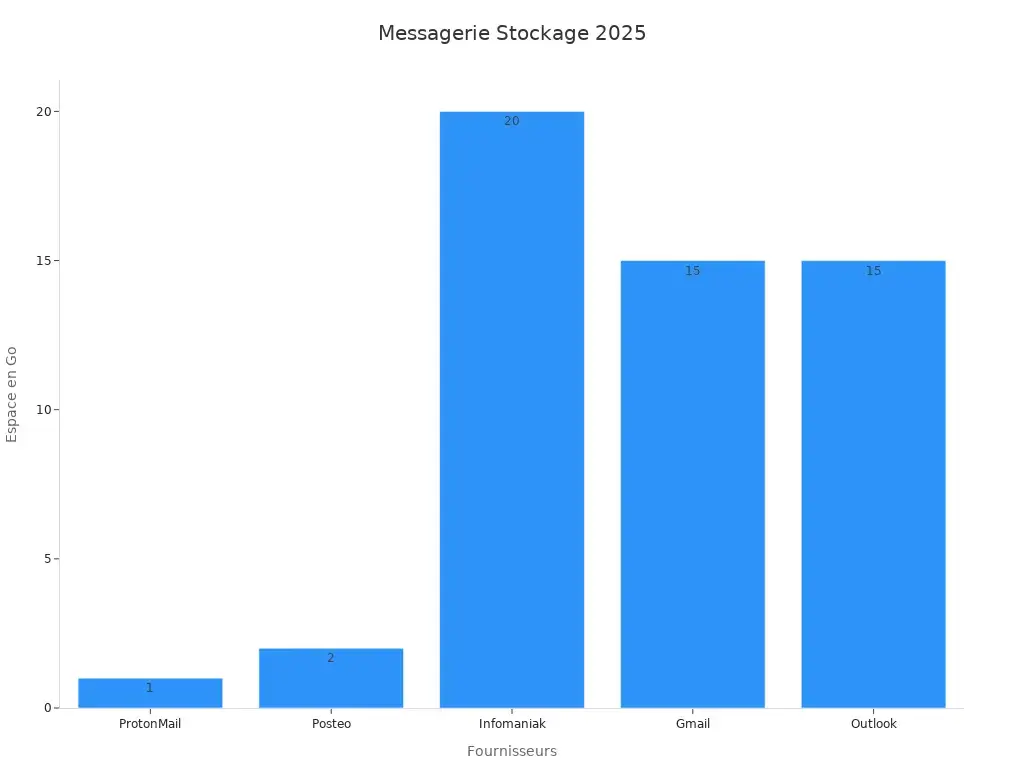
Criteria | ProtonMail | GMX | Posteo | Infomaniak | Gmail | Outlook |
|---|---|---|---|---|---|---|
Storage | 1 GB (free) | 65 GB | 2 GB | 20 GB | 15 GB | 15 GB |
Encryption | End to end | OpenPGP | Non-native | Option | Option | |
Jurisdiction | Swiss | Germany | Germany | Swiss | USA | USA |
Monthly price | 0-5€+ | Free+ | 1€ | Free+ | Free+ | Free+ |
Open Source | Yes | No | Yes | No | No | No |
Mobile apps | Yes | Yes | Yes | Yes | Yes | Yes |
These three email address creation services offer a variety of options to meet your needs. Whether you're looking for an integrated, professional solution, or one with massive storage, you'll find a provider to create an email address that suits your requirements.
Proton Mail: Enhanced Privacy
Creating a Proton Mail email address is the ideal choice if you place great importance on the privacy of your emails. This service, based in Switzerland, adheres to the country's strict data protection laws. It offers end-to-end encryption, guaranteeing that only you and your recipient can read your messages. Even Proton Mail cannot access your emails.
With Proton Mail, you benefit from a simple and intuitive interface. You can send secure emails without needing any technical skills. This service also offers a self-destruct option for messages. This means your emails can be automatically deleted after a certain period, thus strengthening the security of your communications.
🔒 Tip : If you want to protect your sensitive data, create an email address with Proton Mail for your important communications. This service does not scan your emails for advertising purposes, unlike some other providers.
Proton Mail offers 1 GB of free storage, enough for moderate use. You can also upgrade to paid plans for more space. This service is compatible with mobile devices thanks to its dedicated app, allowing you to manage your emails securely from anywhere.
By choosing Proton Mail, you're opting for a solution that prioritizes privacy. This service is perfect for users concerned about protecting their personal and professional data.
🏫 Claire, communications manager for a student association – ProtonMail
“For our association, confidentiality is essential. We chose ProtonMail because it's free, secure, and hosted in Switzerland. The design is clean, and we can easily manage multiple aliases at no cost.”
Zoho Mail: Versatility for individuals and businesses
Creating a Zoho Mail email address stands out for its versatility. This service is suitable for both individuals and businesses. It offers a clean and easy-to-use interface, ideal for managing your emails on a daily basis. With Zoho Mail, you can create a personalized email address, which is a real advantage for professionals looking to strengthen their brand image.
This service offers 5 GB of free storage per user. You can also access collaborative tools like Zoho Docs and Zoho Calendar. These features facilitate teamwork and project management. Zoho Mail also includes effective spam filters to protect your inbox.
💼 Tip : If you're an entrepreneur or work in a team, Zoho Mail can be a valuable ally. Its collaborative tools simplify communication and organization.
Zoho Mail prioritizes security. It offers two-factor authentication and data encryption, protecting your sensitive information from cyberattacks. The service is also compatible with mobile devices, allowing you to stay connected wherever you are.
By choosing to create a Zoho Mail email address, you are opting for a comprehensive and reliable solution. This service meets the needs of both individuals and professionals, while offering advanced features for optimal email management.
💡 Marc, independent trainer – Zoho Mail
“I wanted to create an email address with my domain name, without paying for a full suite. Zoho Mail allowed me to have a free professional address with my own domain, without ads or annoying limits. It's perfect for getting started without looking amateurish.”
Create a GMX email address: a free and reliable alternative to the webmail giants
GMX Mail is a free email service offered by the German company United Internet. Less well-known than Gmail or Outlook, it nevertheless offers a clean interface, 65 GB of storage, efficient attachment management (up to 50 MB), and the ability to link multiple email addresses to a single inbox. It also stands out for its commitment to privacy, with servers based in Europe and a strict confidentiality policy.
Steps to create a free email address
Creating a free email address is quick and easy. Follow the steps below to sign up for the most popular services .
Sign up on Gmail
Gmail address , start by visiting Google's official registration page: Gmail . Here are the steps to follow:
Fill in your personal information : Enter your first name, your last name, and choose a unique username for your email address. For example, “ pr ******** @ *** il.com ”.
Create a secure password : Combine letters, numbers and symbols to ensure the security of your account.
Add your contact information : Provide a phone number and a recovery email address. This information will help you recover your account if there's a problem.
Accept the terms of use : Read the terms carefully and click “Next” to finalize your registration.
💡 Tip : Use a different password for each online account to enhance your security.
Once these steps are completed, you will be able to access your new Gmail inbox and enjoy its features such as Google Drive and Google Meet.
Sign up for Outlook
Creating an email address on Outlook , Microsoft's email service, is an excellent option for both professional and personal use. To create an account, go to Outlook . Follow these steps:
Click on “Create a free account” : This option is located on the homepage.
Choose an email address : Select a username and choose between the domains moc.kooltuo@“ ” or moc.liamtoh@“ ”.
Set a password : Make sure it is strong and easy to remember.
Enter your personal information : Indicate your first name, last name, date of birth and country of residence.
Verify your identity : Microsoft may ask you to confirm your phone number or solve a captcha to prove you are not a robot.
🔒 Note : Enable two-factor authentication as soon as your account is created for enhanced security.
After signing up, you will be able to access your Outlook inbox and use tools like Microsoft Teams and OneDrive.
Sign up for Yahoo Mail
Creating an email address on Yahoo Mail is known for its generous storage space and ease of use. To create an account, visit Yahoo and follow these steps:
Enter your personal information : Provide your first and last name, and choose a username for your email address.
Create a password : Choose a complex password to protect your account.
Add a phone number : This step is mandatory to verify your identity and recover your account if necessary.
Confirm your registration : Yahoo will send you a verification code via SMS. Enter this code to finalize the creation of your account.
📌 Tip : Use Yahoo to create an email address if you need a large amount of storage space to keep your emails and attachments.
Once your account is activated, you will be able to enjoy 1TB of free storage and a user-friendly interface to manage your emails.
Sign up for Proton Mail
Creating an email address with Proton Mail is an excellent option if you're looking for a privacy- and security-focused email service. Based in Switzerland, this service guarantees optimal protection of your data thanks to its end-to-end encryption. Here's how to create your Proton Mail account in a few simple steps:
Access the official website : Go to Proton Mail and click on the “Sign up” button.
Choose a plan : Proton Mail offers several options, including a free plan. Select the one that best suits your needs.
Create your email address : Enter a unique username for your address (for example, “ pr ******** @ **** on.me ”).
Set a secure password : Combine uppercase letters, numbers and symbols to strengthen the security of your account.
Add a recovery address (optional) : This step allows you to recover your account in case you lose your password.
Verify your identity : Proton Mail may request verification via a phone number or other method to ensure you are a legitimate user.
Complete the registration : Once all the information has been filled in, click on “Create an account”.
🔒 Tip : Creating an email address with Proton Mail is ideal for sensitive communications. Use it for your important messages or confidential documents.
After registering, you will be able to access your secure inbox. You will also benefit from options such as message self-destruct and folder management.
Zoho Mail registration
Creating an email address on Zoho Mail is a versatile solution suitable for both individuals and professionals. This service offers an intuitive interface and practical collaborative tools. Follow these steps to create your account:
Visit the official website : Go to Zoho Mail and click on “Sign up now”.
Choose an account type : Zoho offers free accounts for individuals and paid options for businesses. Select “Free” if you are an individual user.
Enter your personal information : Provide your first and last name and an existing email address for recovery.
Create a username : Choose a unique identifier for your address (for example, “ pr ******** @ ****** il.com ”).
Set a password : Make sure it is strong and easy to remember.
Verify your phone number : Zoho will send a verification code via SMS. Enter this code to confirm your identity.
Accept the terms of use : Read the terms and click on “Register” to finalize the creation of your account.
💼 Tip : If you're an entrepreneur, Zoho Mail lets you create a personalized email address with your domain name. This enhances your professional image.
Once your account is activated, you will have access to features like Zoho Calendar and Zoho Docs. These tools make managing your emails and team collaboration easier.
Tips for optimizing your email address
Secure your account with a strong password
A strong password protects your account from hacking attempts. Create a unique password by combining uppercase letters, numbers, and symbols. Avoid common words or personal information such as your first name or date of birth.
💡 Tip : Use a secret phrase that is easy to remember but difficult to guess, such as “MyCatLoves2025!”.
Change your password regularly to strengthen security. If you have trouble managing multiple passwords, try a password manager. These tools securely store your login credentials and allow you to generate strong passwords.
Organize your emails with folders and labels
A well-organized inbox makes managing your emails easier. Create folders to sort your messages by importance or subject. For example, you could have one folder for invoices, another for work emails, and a third for newsletters.
Labels add an extra layer of organization. They allow you to group emails without moving them into a folder. For example, you can label certain messages "Urgent" while leaving them in your main inbox.
📌 Tip : Take a few minutes each week to sort your emails. This prevents the accumulation of unnecessary messages and improves your productivity.
Enable two-factor authentication
Two-factor authentication adds an extra layer of security to your account. It requires two steps to log in: your password and a one-time code sent to your phone or secondary email address.
Enable this feature in your email service settings. For example, Gmail and Outlook offer simple options for setting up two-factor authentication. This system significantly reduces the risk of hacking, even if your password is compromised.
🔒 Note : Two-factor authentication is particularly useful for protecting your free email address against cyberattacks.
By following these tips, you'll optimize the security and organization of your inbox. This ensures a smoother and more secure experience every day.
Delete spam and unnecessary emails
Spam quickly clutters your inbox and makes managing your emails more difficult. You can eliminate it effectively by following a few simple steps.
Use spam filters : Activate the filters built into your email service. Gmail, Outlook, and Yahoo Mail have effective systems for detecting and blocking spam.
Report unwanted emails : When you receive spam, mark it as such. This helps your provider improve its filters and reduce future spam.
Unsubscribe from unnecessary newsletters : Click on the “Unsubscribe” link in promotional emails you no longer read.
💡 Tip : Create a separate email address specifically for online registrations. This will reduce spam in your main inbox.
Make it a habit to regularly delete unnecessary emails. A clean inbox improves your productivity and reduces the stress associated with information overload.
Personalize your electronic signature
A well-designed electronic signature adds a professional touch to your emails. It also makes it easy to share your contact information.
To personalize your signature:
Add your essential information : Include your name, position, phone number and, if necessary, a link to your website or social media.
Use a simple design : Opt for a legible font and avoid overly bright colours.
Here is an example of a professional signature:
Sincerely, [Your First and Last Name] [Your Position] [Your Phone Number] [Your Website or Social Media]
✍️ Tip : If you use Gmail or Outlook, configure your signature in the settings so that it is automatically added to each email.
Email warm-up on Magileads for free
Email warm-up is an essential step to improve email deliverability. It involves gradually sending emails from a new address to establish your reputation with email providers.
With Magileads, you can perform this operation for free. Here's how:
Create an account on Magileads : Register on their platform to access the warmup tool.
Configure your email address : Add your address and follow the instructions to connect it to the service.
Start the warmup : Magileads will automatically send emails to trusted addresses and manage responses to strengthen your address's reputation.
🚀 Note : Warmup is especially useful if you plan to send email campaigns. It ensures that your messages reach your recipients' inboxes.
By using Magileads , you optimize your email campaigns at no extra cost. This improves your results and protects your address from being blocked.
Creating an email address in 2026 is a quick and easy process. Services like Gmail, Outlook, and Proton Mail offer solutions tailored to different needs. You can choose a service based on your priorities: storage, privacy, or collaborative tools. By following the steps outlined and applying the tips provided, you can secure your account and optimize its use. A free email address then becomes an essential tool for your personal and professional communications.
💡 Tip : Take the time to configure your email account to fully enjoy its features.
FAQ for Creating an Email Address
How to choose the best service to create a free email address?
To choose the right one, identify your priorities: storage, privacy, or collaboration tools. For example, Gmail offers 15 GB of storage, while Proton Mail guarantees maximum privacy. Compare the features and choose the one that best suits your needs.
💡 Tip : Check out the comparison charts in this article to help you make your choice.
Can I create a free email address for professional purposes?
Yes, but prioritize services like Outlook or Zoho Mail. They allow you to create personalized email addresses with your domain name, reinforcing your professional image.
📌 Tip : An address like “ pr ******** @ ************* se.com ” looks more credible than a generic address.
What should I do if I forget my password?
Use the “Forgot Password” option on the login page. Provide your recovery email or phone number to reset your password.
🔒 Note : Always set up a recovery address to avoid losing access to your account.
Are free email address creation services really secure?
Yes, most offer tools like two-factor authentication and spam filters. Proton Mail, for example, offers end-to-end encryption.
🚀 Tip : Activate all available security options to protect your data.
Can I migrate my emails from one service to another?
Yes, most services offer import/export tools. For example, Gmail and Outlook allow you to easily transfer your emails and contacts.
💼 Tip : Check the tutorials on the service's website for a smooth migration.






